Topic 1 · Question 97
You plan to extend your company's network to Azure.
The network contains a VPN appliance that uses an IP address of 131.107.200.1.
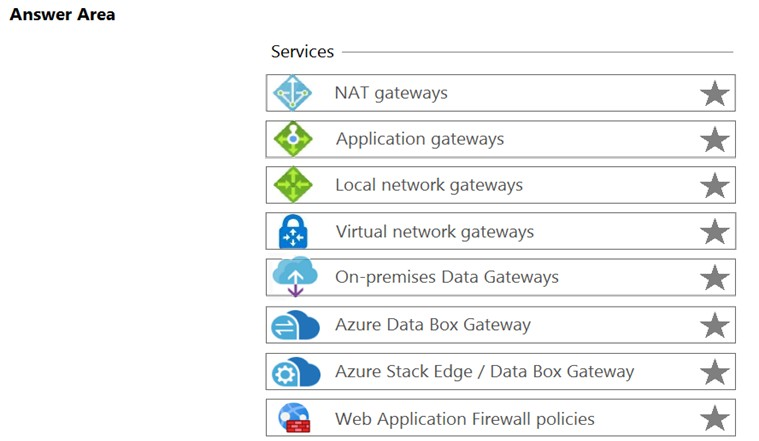
You need to create an Azure resource that defines the VPN appliance in Azure.
Which Azure resource should you create? To answer, select the appropriate resource in the answer area.
Hot Area:
Top comment
BL101▲ 97Highly votedSeptember 29, 2021 10:33 pm
I didn't get this at first - but then re-read the question - the clue is in the extension to Azure which indicates you are on Prem - so you need a Local Network Gateway - that's why people who said Virtual Network Gateway are wrong
14 more highly voted comments
Sarmad_Mansour▲ 44Highly votedJanuary 11, 2023 05:33 am
Not funny, a lot of people do not use English as a 2nd / 3rd language. Please do not judge others.
Sarmad_Mansour▲ 44Highly votedJanuary 11, 2023 05:33 am
Not funny, a lot of people do not use English as a 2nd / 3rd language. Please do not judge others.
dongboy▲ 42Highly votedFebruary 08, 2023 05:46 am
I thought it was funny
dongboy▲ 42Highly votedFebruary 08, 2023 05:46 am
I thought it was funny
dongboy▲ 42Highly votedFebruary 08, 2023 05:46 am
I thought it was funny
ShubahmMaurya▲ 35Highly votedSeptember 03, 2021 07:03 pm
Today 3 SEP 2021, this question was came.
londonite▲ 32Highly votedJanuary 06, 2023 04:14 am
question was came
VinnyMacD▲ 14Highly votedAugust 13, 2023 02:47 pm
Local - means creating a resource in your DC.
Ask is - You need to create an "Azure resource" that defines the VPN "appliance in Azure."
Answer is - Virtual Network Gateway.
Ask is - You need to create an "Azure resource" that defines the VPN "appliance in Azure."
Answer is - Virtual Network Gateway.
Meyti▲ 9Highly votedMarch 07, 2022 12:48 pm
Description of Local Network Gateways in Azure Portal:
"Create a local network gateway to represent the on-premises site that you want to connect to a virtual network. The local network gateway specifies the public IP address of the VPN device and IP address ranges located on the on-premises site. Later, create a VPN gateway connection between the virtual network gateway for the virtual network, and the local network gateway for the on-premises site."
"Create a local network gateway to represent the on-premises site that you want to connect to a virtual network. The local network gateway specifies the public IP address of the VPN device and IP address ranges located on the on-premises site. Later, create a VPN gateway connection between the virtual network gateway for the virtual network, and the local network gateway for the on-premises site."
Foow▲ 9Highly votedJanuary 05, 2022 12:39 pm
Is the word "appliance" also not a flag for recognizing that it is on-premise?
AlexKK▲ 7Highly votedFebruary 26, 2023 02:38 pm
Had that question on (26.02.23). The following questions were included and even a mixture of them. I may repeat a question, but they are repeated here as well. Good luck all.
28,44,46,55,72,80,91,94,95,97,100,107,111,128,134,138,149,151,159,227,258,269,277,278,296,307,331,337,330/350,353,354,394,398,401,405,407
28,44,46,55,72,80,91,94,95,97,100,107,111,128,134,138,149,151,159,227,258,269,277,278,296,307,331,337,330/350,353,354,394,398,401,405,407
RougePotatoe▲ 7Highly votedJanuary 09, 2023 08:19 pm
In support of this answer. Read what is local network gateway. The local network gateway is a specific object that represents your on-premises location (the site) for routing purposes. You give the site a name by which Azure can refer to it, then specify the IP address of the on-premises VPN device to which you'll create a connection. You also specify the IP address prefixes that will be routed through the VPN gateway to the VPN device. The address prefixes you specify are the prefixes located on your on-premises network. If your on-premises network changes or you need to change the public IP address for the VPN device, you can easily update the values later.
https://learn.microsoft.com/en-us/azure/vpn-gateway/tutorial-site-to-site-portal
https://learn.microsoft.com/en-us/azure/vpn-gateway/tutorial-site-to-site-portal
Mdorgham▲ 7Highly votedJanuary 05, 2023 02:57 am
It is not "on prem" ! it clearly mentioned [ "Azure resource" that defines the VPN appliance "in Azure."]...it must be VGW only as an "Azure resource" repressing a VPN appliance in "Azure".
RougePotatoe▲ 7Highly votedJanuary 09, 2023 08:19 pm
In support of this answer. Read what is local network gateway. The local network gateway is a specific object that represents your on-premises location (the site) for routing purposes. You give the site a name by which Azure can refer to it, then specify the IP address of the on-premises VPN device to which you'll create a connection. You also specify the IP address prefixes that will be routed through the VPN gateway to the VPN device. The address prefixes you specify are the prefixes located on your on-premises network. If your on-premises network changes or you need to change the public IP address for the VPN device, you can easily update the values later.
https://learn.microsoft.com/en-us/azure/vpn-gateway/tutorial-site-to-site-portal
https://learn.microsoft.com/en-us/azure/vpn-gateway/tutorial-site-to-site-portal